
Video unavailable
This video can't be played right now.
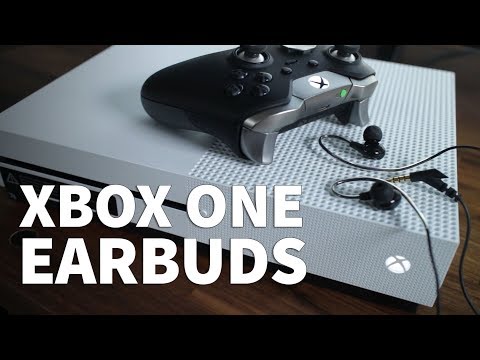
Earbuds for Xbox One Voice Chat and Game Audio – Xbox One Earbuds with Mic KingYou KP05 Headset
KingYou KM03 Earbuds: http://amzn.to/2AAmPoj KingYou KM02 Earbuds: http://amzn.to/2jDluCT KingYou KP05 Earbuds: http://amzn.to/2AotM9u Xbox One Chatpad Headset Combo: http://amzn.to/2jDlPWb The KingYou KP05 earbuds are great for smartphones like iPhones and Androids. They provide decent audio quality for your music while allowing you to make phone calls. But did you know that they work great as an Xbox One headset? If money is tight you should definitely consider these KP05 earbuds for gaming. They’re extremely light-weight and have a high-tech style. These earbuds have soft rubber tips that hold in your ear and are made of a combination of plastic and metal. And they come with 2 extra pairs of replacement tips. What makes these earbuds work with Xbox One controllers is the TRRS plug on the end that has 4 metal sections on it. The TRRS plug routes the correct wiring for the inline microphone mounted on the control strip. The KP05 earbuds plug right into second generation Xbox One controllers through the 3.5mm port. However, if you have a first generation controller, you’ll need a headset adapter or what I recommend is the Xbox One Chatpad. The Chatpad comes with a 3.5mm port built-in. Once plugged in, you can see that a headset is enabled at the top right of the Xbox home screen. It’s also shown in the Party settings. You can confirm that the earbuds are working when you see the circle around your GamerPic light up while talking. I recommend the KP05 earbuds for Xbox One online gaming because they’re inexpensive and you can take them on the go easily. You can’t do this with your big headsets! So now you have another option for chatting online and listening to in-game audio! You can find the latest price of the KP05 earbuds and Chatpad in the description. I hope you found this video helpful and if you did please give me a thumbs up and don’t forget to subscribe to my channel TheRenderQ for more how-to videos and product reviews. ****Equipment I Use For My Videos**** Canon EOS M6: https://go.magik.ly/ml/his4/ Canon EF-M 22mm f/2 Lens: https://go.magik.ly/ml/his5/ Tokina 11-16mm Wide Angle Lens: https://go.magik.ly/ml/hhn5/ Fotodiox EF to EOS M Lens Adapter: https://go.magik.ly/ml/his9/ Comica CVM-WM300A Wireless Microphones: https://go.magik.ly/ml/hisf/ Aputure Amaran AL528W LED Light: https://go.magik.ly/ml/hisj/ Kamerar SD-1 Camera Slider: https://go.magik.ly/ml/hisp/ Manfrotto Aluminum Tripod: https://go.magik.ly/ml/hisw/ AVermedia Game Capture Module: https://go.magik.ly/ml/hitj/ ****For business inquires only feel free to contact me here**** Email: harlany@therenderq.com Twitter: @harlanyee
Suggested videos
How Does YouTube TV DVR Work - How to Record on YouTube TV with Unlimited Storage
TheRenderQ · 4:04
How to Repair and Replace Wooden Fence Section Panel Only – Fix Rotted Leaning Alternating Slats
TheRenderQ · 4:51
How to Fix a Leaky Faucet with a Single Handle Design
TheRenderQ · 4:08

How to Make Vietnamese Fresh Spring Rolls - Goi Cuon with Shrimp and Pork
TheRenderQ · 4:21
Make an Iron Man Arc Reactor for Tony Stark Cosplay – DIY Ultra Thin Wearable with LEDs
TheRenderQ · 7:26
Oculus How to Cast to TV - Watch Oculus Quest 2 on TV Screen with Chromecast or PC Computer
TheRenderQ · 4:15
Squeaky Dishwasher Door Fix – Easy DIY Hinge Repair
TheRenderQ · 1:53
Seagate Storage Expansion Card for Xbox Series S - Install Xbox Storage Expansion Series S & X
TheRenderQ · 4:38