
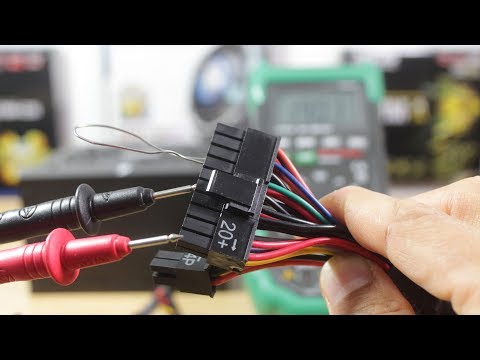
Video unavailable
This video can't be played right now.
How To Test A Power Supply Unit (PSU) With A Digital Multimeter | Advanced Troubleshooting
In this youtube video tutorial I show you how to test a psu with a multimeter or how to test a power supply unit using a digital multimeter. This is an advanced troubleshoot tutorial. There is a paper clip test you can do to check if a power supply is dead or not. However that test only checks for power but not for correct voltage. First you need to test for AC Voltage coming from the mains plug. Next you need to test for DC voltage from each of the pin on the power supply unit. Standard ATX 12V power supply units can be either 20 pins or 24 (20+4) pins. The method is the same for each. This video is also a stand alone tutorial as part of a longer Troubleshoot series, see details in the video and below. Time Stamps: 00:36 Troubleshoot Series Intro | Desktop Pc Computer Not Turning On No Display | How A Computer Works https://www.youtube.com/watch?v=Wkcx-x9gjkg 00:44 Test A Laptop Charger Adaptor With A Digital Multimeter https://www.youtube.com/watch?v=-jbD2bXtZqU 00:50 Troubleshoot A Dead Computer Pc No Power - Desktop PC Computer Not Turning On At All Easy Fix Repair https://www.youtube.com/watch?v=cbYdMIgMlOo 00:55 The paper clip test 001:43 Power Supply Unit Replacement Under 2 minutes Challenge https://www.youtube.com/watch?v=cQqCkIuUEd8 01:55 Mastech Digital Multimeter MS8268 Amazon Affiliate UK: http://amzn.to/2y5xnXC Amazon Affiliate US: http://amzn.to/2xa7ng8 02:53 UK AC Voltage Range: 216.2 to 253V http://www.nottingham.ac.uk/etc/guide-voltageoptimisation.php 03:02 Tolerance of -6% to +10% 04:42 Turn a Computer Power Supply into Bench Power by Jason Poel Smith http://makezine.com/projects/computer-power-supply-to-bench-power-supply-adapter/ 06:00 Laptop No Display Black Screen Blank Screen On Startup | Best Guide How To Fix Troubleshoot Repair https://www.youtube.com/watch?v=E60VjaeNnP4 07:26 DC Volt Tolerance Red/Purple: 5V +/- 4% = 4.8 to 5.2 V Yellow/Blue: 12V +/- 4% = 11.52 to 12.48 Orange: 3.3V +/- 4% = 3.168 to 3.432 10:18 How To Take Out Or Remove A Motherboard From A Desktop Computer Case | Breadboarding Easy Mode https://www.youtube.com/watch?v=UM-9wAUQCdU Affiliate Product Links: Canon EOS 1300D UK: http://amzn.to/2h8SZvw Canon EOS 1300D US: http://amzn.to/2xplQW1 Boya BY M1 Lavalier Microphone UK: http://amzn.to/2xHslo4 Boya BY M1 Lavalier Microphone US: http://amzn.to/2y4Ydze Zoom H1 Recorder UK: http://amzn.to/2w14L0W Zoom H1 Recorder US: http://amzn.to/2xGyqkB Mastech Digital Multimeter MS8268 UK: http://amzn.to/2y5xnXC Mastech Digital Multimeter MS8268 US: http://amzn.to/2xa7ng8 HealMyTech Custom Amazon Affiliate Links: UK Amazon Affiliate link: http://www.amazon.co.uk/?tag=healmytech-21 US Amazon Affiliate link: http://www.amazon.com/?tag=healmytech-20 Subscribe to my channel: HealMyTech http://www.youtube.com/c/healmypc99 Connect with me: Email: healmytech@gmail.com Twitter: @healmytech Facebook: https://www.facebook.com/Healmytech-1739142406338235/ Thanks for watching! Don't Click This! https://www.youtube.com/channel/UCCN6jhE-nqsfmp1GYazd2wA?sub_confirmation=1
Suggested videos

How To Troubleshoot A Motherboard - Live Pt 3 Computer Tuning On But No Display On Monitor
HealMyTech · 1:11:32
How to Manually Test a Power Supply With a Multimeter
Lifewire · 1:21

HealMyTech YouTube Channel Trailer
HealMyTech · 1:23

How to Easily Test Any PC Power Supply in 2025!
Electrical You · 7:14

Laptop No Display Black Screen Blank Screen On Startup | How To Fix Troubleshoot Repair | New
HealMyTech · 18:48
Corsair Video FAQ: How to test a Corsair power supply
CORSAIR · 2:30

NURSE To TECH Repair Career Change For FREE At YouTube University
HealMyTech · 19:11
How to test virtually any ATX power supply easily.
The Hard Road · 1:29

Computer Turning On But No Display - Pt 8 Troubleshoot A Monitor
HealMyTech · 8:02
Power Supply Troubleshooting and Repair Tips
Mr Carlson's Lab · 31:26
How To Test A CPU To See If It Works - Pt 4 Troubleshoot A Processor
HealMyTech · 13:18

Top 10 Signs of Power Supply Failure
Velocity Micro · 1:56