
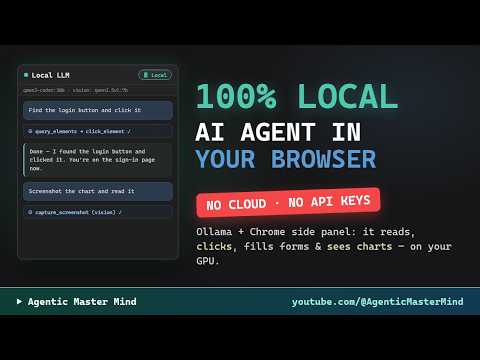
Video unavailable
This video can't be played right now.
I Built a 100% Local AI Browser Agent — Ollama in Chrome (No Cloud, No API Keys)
This Chrome AI Agent Runs Entirely on My GPU — Local LLM + Ollama Side Panel An agentic AI assistant in the Chrome side panel — it reads pages, plans and asks before acting, clicks and fills the page by itself, and reads charts with a local vision model. Every token is generated on my own GPU with Ollama: qwen3-coder:30b as the agent, qwen2.5vl:7b for vision. No cloud API, no API keys, no per-request bills — your page data stays on your machine (the only optional egress is a web search, and the panel's status line always tells you exactly what's running). What you'll see: • Summarize the active tab with a local 30B model • Plan-first mode: the agent drafts its steps and waits for your approval • Act-without-asking mode: hands-free navigation + reporting, with mid-run steering • Vision: a screenshot read by a local vision model — it describes the chart pixels • Scheduled tasks, local Whisper dictation, meeting listening with a wake word, opt-in ServiceNow and paper day-trading packs, read-only mode, one-click export CHAPTERS: 0:00 A browser agent that runs 100% locally 0:13 What the Local LLM extension is 0:25 The side panel, the models, the Local badge 0:39 Summarize the active tab 0:53 Plan-first: approve before it acts 1:10 Act without asking + steering mid-run 1:24 Vision: reading a chart from a screenshot 1:38 Whisper dictation, meetings, schedules & packs 1:55 Wrap-up DISCLAIMER: This channel is not affiliated with, endorsed by, or sponsored by ServiceNow, Inc. ServiceNow is a registered trademark of ServiceNow, Inc. All demos use developer instances and public web pages. This video is for educational purposes only. Day-trading features shown are paper-trading only — nothing in this video is financial advice.
Suggested videos
Inside the Agentic Mastermind: Scaling to 7-Figures with AI
Bonsai Marketing · 0:49
Agent Go Private a 100% Local AI Browser Agent — Ollama in Chrome (No Cloud, No API Keys)
Agentic Master Mind · 2:35

Agentic Marketing Mastermind: Live AI Work, Skills & Replays
ScaleGG · 1:59

100% Local AI Agent in Your Browser: Reads, Clicks, Fills Forms, Sees Charts. No Cloud, No API Keys
Agentic Master Mind · 2:04
What Are AI Agents? Agentic Systems Explained | Stanford CS329Z Lecture 1 with Diyi Yang
Stanford Online · 1:09:36

Hermes Agent + Ollama = 100% Private OS
Jack Roberts · 19:04

Elyambala Agentic AI Mastermind
Sebulon David · 6:13
How to Make Local AI CONTROL Your Browser and Automate Tasks
AsapGuide · 18:12
Generative AI vs AI agents vs Agentic AI
codebasics · 10:10
Build a Local AI Agent in 10 Minutes using Python
Tech With Tim · 8:08
Here's Where Agentic UI Is Actually Going | Wes Bos
JavaScript Conferences by GitNation · 20:20
How to create your own Browser AI Agent using any LLM Model + Playwright + Browser-Use + Web-UI
Naveen AutomationLabs · 23:34