
Video unavailable
This video can't be played right now.
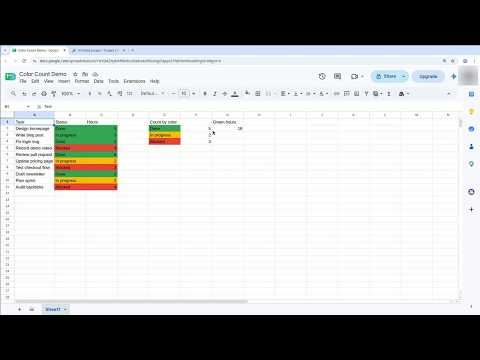
How To Count Colored Cells In Google Sheets - Full Guide
Want to count only the green cells in Google Sheets? There is no built-in button for it, and COUNTIF counts values, not colors. This guide shows three ways that actually work: filter by color for a quick answer, sort by color when you do not want to hide rows, and a small Apps Script custom function when the number has to live in a cell — plus a second function that adds up the numbers in the colored cells. Chapters: 0:00 - The problem: color is invisible to formulas 0:12 - Step 1: the honest answer with COUNTIF 0:33 - Step 2: filter by color 1:02 - Step 3: the custom function in Apps Script 1:34 - Step 4: the summary and the recalc trap 1:59 - Step 5: add up the colored cells 2:25 - Recap The Apps Script code (Extensions, then Apps Script — paste both functions, save, and use them like any formula): function countColoredCells(countRange, colorRef) { var sheet = SpreadsheetApp.getActiveSpreadsheet().getActiveSheet(); var range = sheet.getRange(countRange); var backgrounds = range.getBackgrounds(); var color = sheet.getRange(colorRef).getBackground(); var count = 0; for (var i = 0; i != backgrounds.length; i++) { for (var j = 0; j != backgrounds[i].length; j++) { if (backgrounds[i][j] === color) { count++; } } } return count; } function sumColoredCells(sumRange, colorRef) { var sheet = SpreadsheetApp.getActiveSpreadsheet().getActiveSheet(); var range = sheet.getRange(sumRange); var backgrounds = range.getBackgrounds(); var values = range.getValues(); var color = sheet.getRange(colorRef).getBackground(); var total = 0; for (var i = 0; i != backgrounds.length; i++) { for (var j = 0; j != backgrounds[i].length; j++) { if (backgrounds[i][j] === color) { total += Number(values[i][j]) || 0; } } } return total; } Use them like this: =countColoredCells("B2:B11","B2") counts the cells in B2:B11 with the same fill as B2. One warning: the function does not recalculate when you recolor a cell — delete the formula and type it again to refresh it. Which color do you track most? Tell us in the comments.
Suggested videos

Drawing a Basic Square Using Turtle in Python – Beginner's Guide!
Delft Stack · 3:17

How to Quickly Remove a Pop-Up in Google Chrome | DelftStack Tutorial
Delft Stack · 0:59

How to Turn Off Gboard Predictive Suggestions on REDMI Note 17 Pro 5G with HyperOS 3
Delft Stack · 1:00

How to Fix Microsoft Store Error 0x80073d02 in Windows 10/11 [Solved]
Delft Stack · 2:19

How to View WiFi Signal Strength on Windows
Delft Stack · 2:09

How to Hide Like Count on Instagram
Delft Stack · 2:14
Stop Unwanted Pages from Popping Up in Google Chrome | DelftStack Tutorial
Delft Stack · 1:11

How to Free Up Space in Ubuntu and Other Linux Distributions
Delft Stack · 1:44